


Nothing is uploaded · the file never leaves your device
Sign a PDF in under a minute.
Sign, fill, highlight and change the text that is already there — by hand, or by asking for the edit in plain words.
Drop a PDF here
Opening your PDF…
or pick one from your device
Opened by your browser, not by a server
Inside the editor
contract-signed.pdf
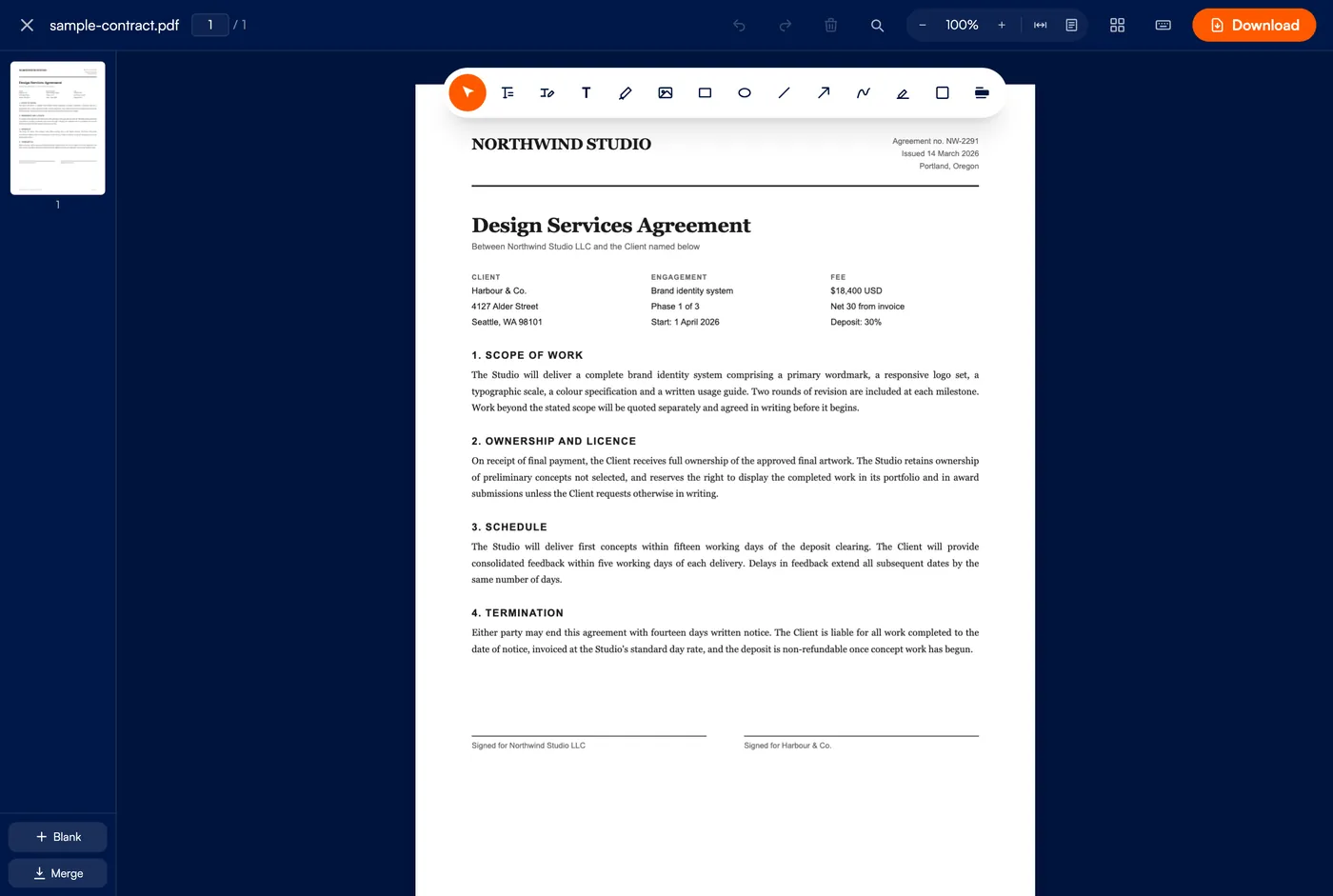
- Signature
- draw, type or upload
- Text
- edit in place
- Pages
- split, rotate, reorder
Up to 50 MB · sign in to download · privacy
Replacing across many pages takes a moment — each page has to be opened before its text can be changed.
This looks like a scan. Its words are part of the picture, so they can't be searched or edited yet. Reading them takes a moment and happens entirely in your browser.
Your document is open. What would you like to do?
Original text removed
the page itself, so the old wording is gone from the file rather than hidden.
covered, not removed
For , the original wording stays inside the file and can still be recovered. Don't use this to hide confidential information.
The other the page itself, leaving nothing behind.
Matching with the closest embeddable font — close, but not identical.
the space it replaced, so the extra lines will overlap what follows.
edits sit on a patterned background, where the patch will be visible.
The text underneath is deleted from the file, not just covered — it cannot be selected, copied or recovered. The file is checked after export and you will be told if anything survived.
This PDF is password protected
Enter the password to open it. Nothing is uploaded - the password is only used in your browser.
pages will be saved as a new PDF. Your open document is unchanged.
The original wording is still inside the file and can be recovered. Don't send this to hide confidential information.
itself, leaving nothing behind.
the space it replaced, so the extra lines overlap what follows.
This uses one of today's downloads.
Whole document
A watermark sits on top of the page. It marks a document, it does not protect it — anyone can select the text underneath. Use Redact for that.
This document splits into files. It counts as one download, not one per file.
Your browser may ask permission before saving several files at once.
Content is scaled to fit and centred, never stretched, so nothing distorts. Portrait pages stay portrait and landscape stay landscape. Applied to the whole document when you download.
Every page will be in the downloaded file.
This is what search tools and file managers show for the document. Written when you download. A field left blank keeps whatever the original file said rather than clearing it.
Keyboard shortcuts
Sign the document
Use a saved signature
The toolbox
Everything a PDF usually needs
Fifteen tools, all in one bar across the top of the page. Hover any icon to see its name.
Sign and fill
Draw a signature, type one in a script face, or upload an image of yours. Saved signatures go down with a single tap next time.
Edit the text that is there
Change wording in the original document, not just on top of it. Find and replace across every page, or describe the change and let the assistant make it.
Highlight, white out, redact
Mark up what matters, cover what does not, and redact sensitive passages so the words underneath are gone rather than hidden.
Shapes and arrows
Rectangles, circles, lines and arrows, with alignment and distribution once you have more than one.
Pages, not just marks
Rotate, reorder, delete and split pages, merge another PDF in, or add page numbers, headers and watermarks.
Still a real PDF
Edits are written as text and vector shapes rather than a flattened picture, so the result stays searchable and prints sharp.
Start to finish
Open, edit, download
Nothing leaves your device at any point
Step 01
Open your PDF
Drop a file on the page or pick one from your device. It opens straight away — there is no upload and no queue. Password-protected files unlock locally when you enter the password.
Step 02
Make your changes
Pick a tool and click the page to place a signature, text, a highlight or a shape. Ctrl+Z undoes anything, and your work is kept if the tab closes by accident.
Step 03
Download it
Save the finished PDF straight to your device. This step needs a free account — three downloads a day, more on a paid plan. Your work waits here in the browser while you sign in.
Answers
Questions people ask
Is my PDF uploaded to a server?
No. Every edit happens in your browser using your own device's processing power. The file is never sent anywhere, which is also why it works offline once the page has loaded.
Will the text stay searchable after I edit it?
Yes. Edits are added as real text and vector shapes rather than a flattened image, so the result stays selectable, searchable and sharp in print.
What is the maximum file size?
50 MB, which covers the vast majority of contracts, forms and reports. Because the work happens on your device, very large documents are limited more by your device's memory than by us.
Can I edit a password-protected PDF?
Yes. Enter the password when prompted and the file unlocks locally in your browser, exactly like every other step — the password is never sent to us either.
Do I need an account?
Not to edit. Opening a PDF and changing it is free and unlimited, with or without one. Saving the finished file needs a free account — three downloads a day — and a paid plan raises that. Nothing is lost while you sign in: the document and every edit stay in this browser and are offered back when you return.
How many AI edits do I get?
Ten a day without an account, twenty with a free one, and a hundred a day on a paid plan. Editing by hand is never metered — the count only moves when you ask the assistant to make a change.
Can I undo a mistake?
Yes — Ctrl+Z (Cmd+Z on a Mac) undoes, Ctrl+Shift+Z redoes, at any point while editing. If the tab closes by accident, the editor offers to restore your unsaved work next time.
Open a PDF and start
Free to edit, no account needed, and your document never leaves your device.