You found the one page that explains the thing properly. Six months later the bookmark returns a 404, or a redesigned page with that section quietly deleted, and the copy you pasted into your notes app arrived as a wall of navigation links, cookie-banner text and a "Related articles" widget.
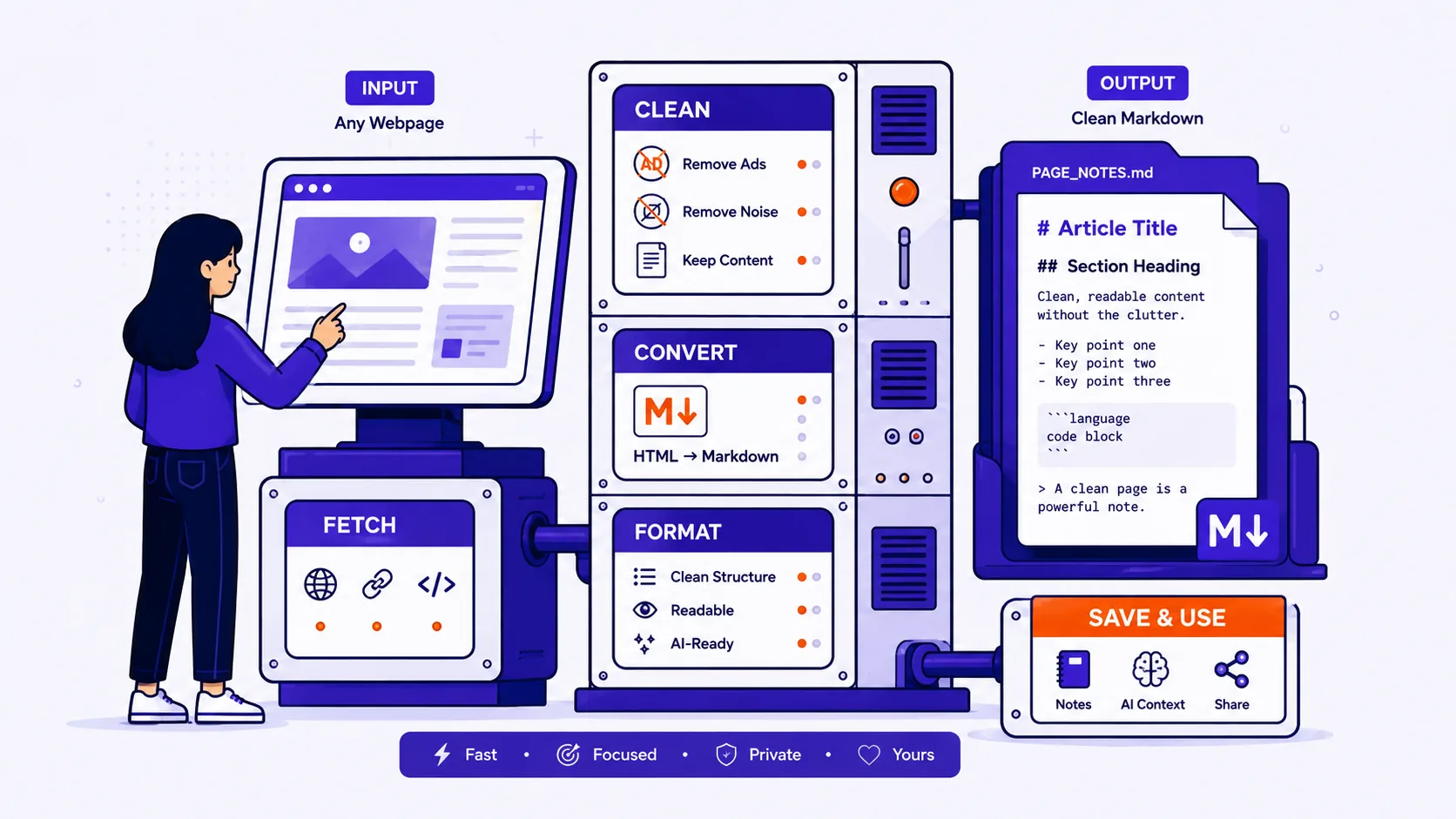
Saving the page as Markdown fixes both halves of that problem. You get the words, in a plain-text format your notes app and your model both read natively, sitting on a disk you control.
Four reasons people actually do this
Research notes. A bookmark is a promise that someone else will keep hosting a page for you. Markdown in your own knowledge base is a copy. It also becomes searchable alongside everything else you have written, which a bookmark never is.
Feeding documentation to a model. If you paste raw HTML into a chat window, most of your context budget goes to class attributes, inline SVG icons, analytics scripts and a navigation tree the model does not need. The numbers below are worse than most people guess.
Archiving documentation that keeps moving. API docs, pricing pages and policy pages change without notice. A dated Markdown capture in Git gives you a diff: you can see exactly which sentence changed and when.
Migrating off a CMS. Markdown is the practical interchange format between static site generators, wikis and note apps. Exporting from a CMS that only offers you rendered HTML usually means converting page by page.
What actually happens during conversion
A good converter does two separate jobs, and they fail in different ways.
Boilerplate extraction decides which part of the DOM is the article. The reference implementation is Mozilla's Readability, the library behind Firefox Reader View, and its heuristics are worth knowing because almost every tool borrows them. It walks candidate block elements and scores each one: one point as a base, one point per comma, and one more per 100 characters of text up to a maximum of three. Each candidate's score is then multiplied by (1 - link density), so a <div> that is mostly hyperlinks, a nav, a footer, a related-posts block, scores near zero no matter how much text it holds.
On top of that it strips nodes whose class or id matches an "unlikely candidates" pattern, which in the current source includes banner, breadcrumbs, comment, footer, gdpr, menu, related, sidebar, social, sponsor and popup. It also refuses to return a result at all if the winning candidate has under 500 characters of text, on the assumption that it picked wrong.
HTML-to-Markdown mapping is the mechanical half: <h2> becomes ##, <strong> becomes **, <ul> becomes -, <blockquote> becomes >, <pre><code> becomes a fenced block, <a> becomes [text](url). This part is close to lossless for ordinary prose and completely lossless for nothing.
The token arithmetic, measured
I converted four public PyPI project pages on 23 August 2026 with a Readability port plus an HTML-to-Markdown converter, and tokenised both versions with a 65,000-token byte-pair tokeniser (the one bundled in version 0.34.2 of the anthropic Python package).
| Page | Raw HTML | Markdown | HTML tokens | Markdown tokens | Ratio |
|---|---|---|---|---|---|
| pypi.org/project/requests | 246,270 B | 3,938 B | 71,030 | 1,397 | 50.8x |
| pypi.org/project/beautifulsoup4 | 110,886 B | 2,164 B | 32,269 | 553 | 58.4x |
| pypi.org/project/pandas | 532,715 B | 9,093 B | 165,230 | 2,471 | 66.9x |
| pypi.org/project/httpx | 141,406 B | 5,068 B | 41,714 | 1,707 | 24.4x |
| All four | 1,031,277 B | 20,263 B | 310,243 | 6,128 | 50.6x |
The pandas row is the one to sit with. Its raw HTML is 165,230 tokens, which will not fit in a 128,000-token context window at all. The same page as Markdown is 2,471 tokens, you could fit roughly 80 of them in a 200,000-token window and still have room to ask a question.
One result surprised me. Characters per token came out at 3.32 for the HTML and 3.31 for the Markdown, essentially identical, and both close to OpenAI's published rule of thumb that one token is about four characters of English. So the saving is not that HTML tokenises inefficiently. It is that there is fifty times more of it, and most of that bulk is scripts, inline styles and navigation that the extraction step throws away before any tag-stripping happens.
These are script-heavy pages. A lean, hand-written documentation page will land lower, but the direction is never in doubt.
What gets lost or mangled
Be honest with yourself about this before you archive something important.
| Problem | What you get | What to do |
|---|---|---|
| Content rendered by JavaScript after page load | Empty sections, or a skeleton loader's placeholder text | Check the capture against the live page; use a headless-browser capture for infinite-scroll pages |
| Tabs and accordions | Depends entirely on whether the hidden panels are in the initial DOM or fetched on click | Open every tab in the browser first and compare section counts |
Images set as CSS background-image |
Nothing, there is no <img> element to convert |
Save those images by hand |
Lazy-loaded images using data-src placeholders |
An ![]() pointing at a 1x1 transparent GIF |
Check for suspiciously tiny image URLs |
| Paywalled body text | Whatever the server sent, which is often the first two paragraphs | Nothing a converter can fix; the text was never in the response |
| Complex nested tables | Flattened or dropped: GFM tables cannot contain block-level elements, so a list or a nested table inside a cell has nowhere to go | Screenshot it, or keep the HTML table verbatim |
| Footnotes and citations | Reference markers survive as links; the footnote text often lands in a stripped <section> |
Verify the bottom of the capture |
| Syntax-highlighted code | The code is fine, but the language label lives in class="language-python", and the GFM spec does not mandate any treatment of the info string |
Add the language after the opening fence yourself |
| Math | MathML is Baseline widely available since January 2023 and converts to nothing useful; math rendered as images converts to alt text, if there is any | Keep the original page for anything equation-heavy |
Two habits that matter more than the tool
Force every link to an absolute URL. A page's own <a href="/api/reference"> is meaningless once the file is sitting in your notes folder. Readability's own documentation tells implementers to pass the page URI so it can convert relative URLs to absolute counterparts, a converter that skips this step hands you a file full of dead links. Check one relative-looking link in every capture.
Put the source URL and retrieval date at the top of every file. Four lines of YAML front matter is enough:
source_url: https://example.com/docs/api/pagination
retrieved: 2026-08-23
title: Pagination
This is the single habit that separates a research archive from a folder of orphaned text. In six months you will need to know whether your copy predates a documented breaking change, and there is no way to recover that after the fact.
If you want the conversion done without installing anything, Qikks Tools' webpage-to-Markdown converter takes a URL, runs article detection in your browser, rewrites links to absolute URLs, and has a whole-page toggle for documentation sites and wikis where the content is not article-shaped enough for Readability's heuristics to find it.
Etiquette and the legal edge
Saving a page you can already read, for your own reference, is ordinary browser behaviour, it is what Reader View and Ctrl+S already do. Republishing that text is a different act, and copyright applies to it exactly as it did on the original page.
robots.txt is worth respecting when you are fetching at any scale. It is now an IETF standard, RFC 9309, which defines rules for automated clients, and which states plainly that those rules "are not a form of access authorization." Terms of service are the binding document, not the robots file. If you are pulling more than a handful of pages, read the terms, keep your request rate low, and check whether the site publishes the docs as Markdown already. Many do.
Before you file a capture
- Compare the section headings in your Markdown against the live page.
- Open every tab and accordion, then re-check.
- Click one relative-looking link to confirm it resolved to an absolute URL.
- Add the language to any fenced code block that lost its label.
- Scroll to the bottom and confirm footnotes and references came through.
- Add
source_urlandretrievedfront matter before you save.