Your main image looks white on your monitor, and Amazon disagrees. Either the listing got suppressed with a note about a non-pure-white background, or it went live and now sits on the detail page as a faintly grey rectangle while the competitor above it floats cleanly on the page.
The usual culprit is a background sitting at RGB 250,250,250 or 248,248,248, visually white, technically not. Below are the rules Amazon publishes in its own seller-facing style guides, and the steps that get a file to meet them without guessing.
A warning before the specs: Amazon's detailed image requirements live in category style guides, and the numbers in them genuinely differ. Find yours in Seller Central before you commit to a shoot spec.
The rules that do not vary
Every Amazon style guide I checked states the same three things about the MAIN image.
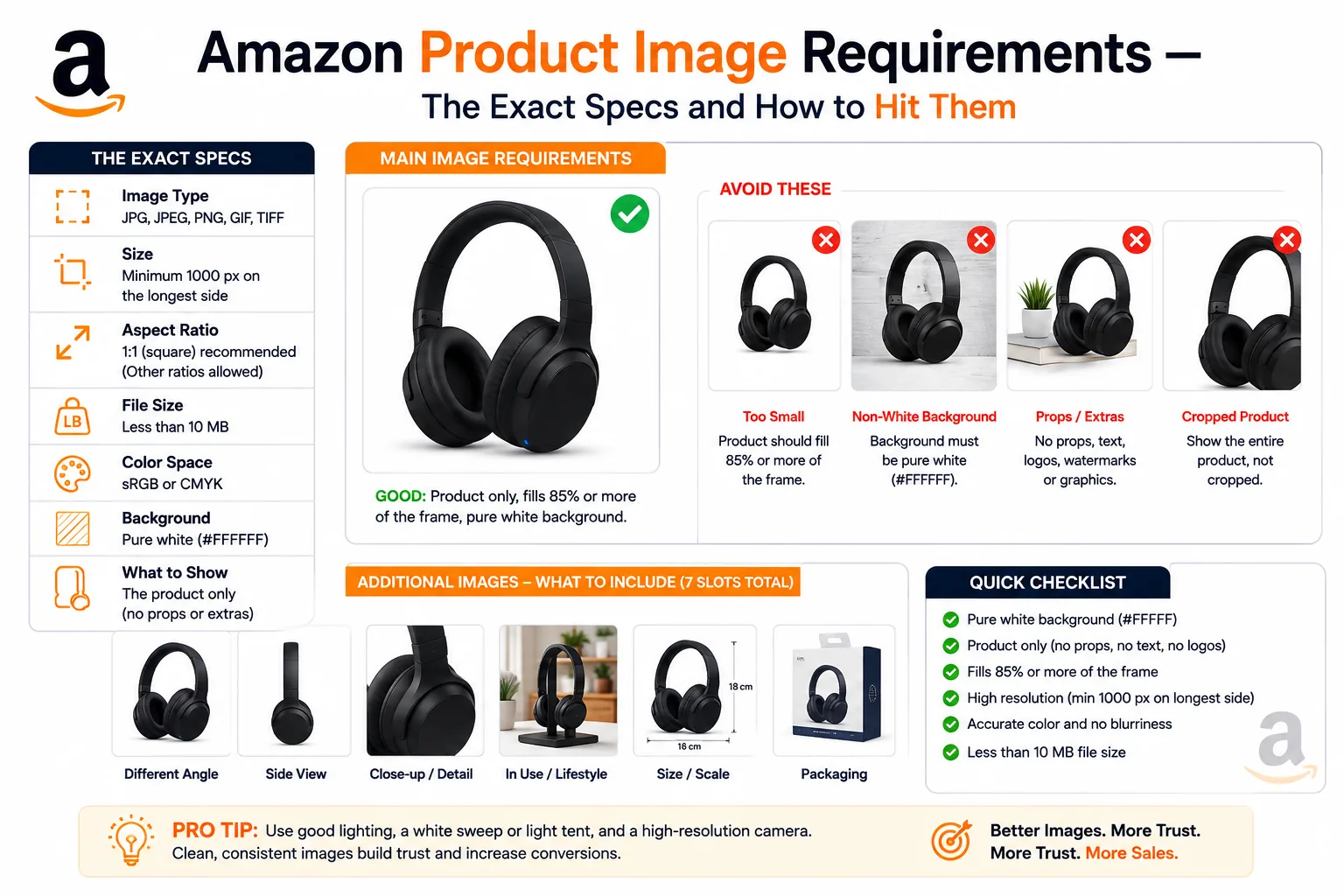
Pure white background. Amazon's Shoes category style guide spells out the reasoning and the value: "pure white blends in with the Amazon search and product detail pages, RGB color values of 255, 255, 255; hex #FFFFFF". The Clothing & Accessories style guide gives the identical figure, and the Home Selection Image Guide repeats it.
85% frame fill. The Shoes guide: "the product must fill at least 85% of the image area." The Home guide sets the same minimum. Aim at the low end, cropping tight enough to clip a sellable feature is its own violation.
Nothing in the frame but the product. The Clothing guide bans "borders, logos, watermarks, inset images, text, color blocks", any prop not included with the purchase, promotional wording like "sale" or "free shipping", and multiple views composited into one image. The Shoes guide adds no mannequins, no shoe boxes, and no illustrations standing in for a photograph. The Home guide adds no design sketches or renderings.
The numbers that vary by category
| Spec | Shoes | Clothing & Accessories | Home |
|---|---|---|---|
| Minimum longest side | 1,000 px | 1,000 px | 2,000 px |
| Maximum | not stated | 3,900 px | 10,000 px per side |
| Minimum aspect | 190 x 246 px | 190 x 246 px (10:13) | , |
| Formats | JPEG (preferred), TIFF | JPEG or TIFF preferred, PNG accepted | JPEG (preferred), TIFF, PNG, GIF |
| Colour mode | colour, not black and white | RGB preferred; CMYK accepted but may shift | sRGB |
| Resolution | 72 dpi minimum | 72 dpi minimum | , |
The 1,000 px figure is the zoom threshold. The Shoes guide states that images at 1,000 pixels or larger in either height or width enable the zoom viewer, which Amazon says has "been proven to enhance sales." Below that, the magnifier simply does not appear.
Note the trap in that table: a 3,900 px cap for apparel and a 10,000 px cap for home goods. A single house export preset cannot serve both catalogues.
You will see 1,600 px quoted widely as the recommended minimum. Amazon does not publish that number in any of the category style guides above; it is a convention among sellers, traced to a wording change in Seller Central help content and discussed at length in the seller forums, a user thread, not policy. Since Home already demands 2,000 px, exporting everything at 2,000 px on the longest side clears the published minimum in each guide and stays inside the apparel ceiling. Use 2,000.
Ignore DPI while you are at it. Amazon states 72 dpi as a floor, but DPI is a metadata tag with no effect on how a raster image renders in a browser. Pixel count is what determines whether zoom fires.
File naming. Both fashion guides use [ProductIdentifier].[VariantCode].[Extension], for example B00SAMPLE.FRNT.jpg. The identifier is an ASIN, UPC, EAN or JAN with no dashes, spaces or punctuation. MAIN is the primary slot; alternates use codes like PT01 through PT08 or view codes such as FRNT, BACK, TOPP, RGHT, BOTT and PAIR.
What the additional images are for
Everything the main image forbids is fair game in the alternate slots. The Clothing guide states plainly that alternate images may be "environment or on location images and can use props", different angles, cross-sections, texture and fabric detail, brand tags, styling context. The white-background rule does not apply to them. Up to eight alternates are permitted.
The Home guide is more prescriptive, defining slots by purpose: PT01 shows all components straight to camera, PT88 a material detail (minimum 500 x 500 px), PT12 a scale reference with visible measurements, SWCH a flat colour swatch (minimum 50 x 50 px, square), and EV01 a stylised environmental shot.
Category-specific main image rules
Shoes. One shoe only, except in PAIR slots. Shot at a 3/4 view of roughly 40 degrees from slightly above, with the toe facing left, and completely in focus front to back.
Clothing. On-figure is mandatory for most garments, tops, dresses, outerwear, trousers, jumpsuits, suits, while kids and baby items, accessories such as scarves, belts, hats and ties, and multipacks must be shot flat or off-figure. Models must stand, not sit, kneel, lean or lie down, and must wear shoes except in swimwear and sleepwear. Flat lays should be symmetrical left to right, steamed, and free of loose threads.
Home. MAIN is shot at a 30-degree angle facing right, straight-on for flat categories such as artwork, showing all components in their primary use configuration.
Books. The cover art is the product, so text and logos on it are not a violation. Amazon KDP's cover requirements call for TIFF or JPEG, an ideal 2,560 x 1,600 px, a minimum of 1,000 x 625, a height-to-width ratio of at least 1.6:1, RGB colour, and a file under 50MB. KDP even inverts the main-image rule: if your cover is white or very light, add a narrow 3-4 pixel medium-grey border so it does not vanish against the page.
The workflow to produce a compliant file
- Start from the largest original you have. Upscaling a 900 px file to 2,000 px produces the soft result Amazon rejects as pixelated. Go back to the camera file.
- Cut the product out of its background. A grey seamless sweep, a lightbox with a colour cast, or a kitchen table all fail the same way. Separating subject from background is what makes true white achievable, a background remover does this in the browser without uploading the shot anywhere.
- Flatten onto white, not transparency. A cut-out saved as a transparent PNG is not a white background; it is no background. Composite onto a solid 255,255,255 layer before export. Saving as JPEG forces the issue, since JPEG has no alpha channel.
- Square the canvas and set margins deliberately. On a 2,000 px square, 85% coverage means the product's longest dimension measures about 1,700 px, leaving roughly 150 px of white each side: 2000 x 0.85 = 1700, and (2000 − 1700) / 2 = 150.
- Resize to target. An image resizer handles the final dimension in one step. Check your category ceiling first.
- Export as JPEG at quality 90+, in sRGB, named with the product identifier and variant code.
How to prove the background is 255,255,255
Do not trust your eyes, or a monitor applying its own colour profile.
Eyedropper, point sample. In Photoshop set the eyedropper sample size to Point Sample, not 3x3 Average, averaging hides stray off-white pixels. Read the Info panel at all four corners, each edge midpoint, and immediately beside the product outline. GIMP's pointer window does the same.
Threshold, for a whole-image answer. Photoshop: Image > Adjustments > Threshold, slider to 254. Everything below 254 turns black, so a compliant background goes entirely white with the product as a black silhouette; a grey cast shows up as a black field around it. GIMP: Colors > Threshold. Undo afterwards.
One command, with ImageMagick. identify -format "%[fx:round(maxima*255)]\n" main.jpg prints the brightest channel value in the file. I ran this on two test files in a sandbox: a genuine white background returned 255, a 250,250,250 background returned 252. Anything under 255 means the file contains no pure white at all, a definitive fail. A 255 result is necessary but not sufficient, since one white pixel satisfies it, so pair it with the threshold check.
One thing that is usually not to blame: JPEG compression. I generated a 1,600 px white-background test file, saved it at quality 95, 80 and 60, and measured every pixel in the outer 100 px border of each. All 600,000 border pixels stayed at exactly 255,255,255 in all three. Ringing artefacts appeared, but confined to roughly one pixel immediately adjacent to the product edge. If your background reads 250, the fault is in the capture or the edit, not the export.
Pre-upload checklist
- Category style guide opened and its pixel ceiling confirmed
- Longest side 2,000 px, or whatever your guide's minimum demands
- Product filling at least 85% of the frame, nothing clipped
- Threshold test at 254 shows white everywhere except the product
- No text, logo, watermark, border, inset or prop anywhere in the frame
- Saved as JPEG, RGB, quality 90+
- Filename is identifier plus variant code, e.g.
B00SAMPLE.MAIN.jpg - Alternate slots filled with the lifestyle shots, props and callouts the main image cannot carry