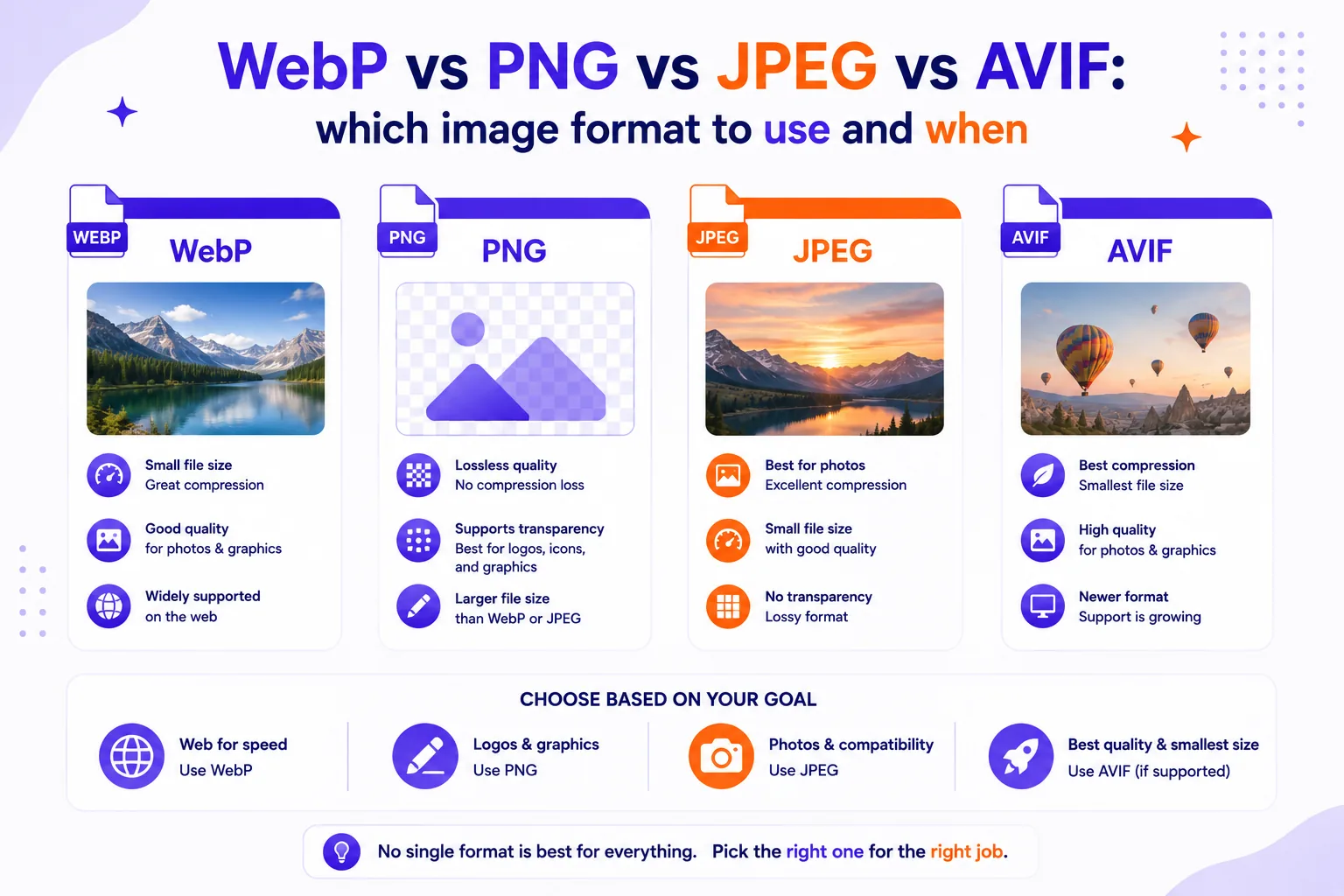
Your product shot is a 4 MB PNG, your documentation screenshots went fuzzy the moment you saved them as JPEG, and somebody on your team keeps insisting the whole library should be AVIF by Friday. The right format is not a matter of taste; it depends on whether the image is a photograph, a screenshot, or a logo, and on what you plan to do with it afterwards.
Here is what each format actually supports, what I measured when I encoded the same two images into all four, and a fallback pattern that lets you ship the small formats without breaking anything.
What the four formats support
| JPEG | PNG | WebP | AVIF | |
|---|---|---|---|---|
| Compression | Lossy (DCT) | Lossless | Lossy or lossless | Lossy or lossless |
| Transparency | No | Yes, full alpha | Yes, in both modes | Yes |
| Animation | No | Yes (APNG) | Yes | Yes |
| Bit depth | 8 bits per component | 1–16 bits per sample | 8-bit only | 8, 10 or 12-bit |
| HDR | No | Yes (PNG 3rd edition) | No | Yes, plus wide gamut |
| Browser support | Universal | Universal | 96.18% | 94.67% |
Those last two figures are from caniuse as of this writing: WebP at 96.18% and AVIF at 94.67% of tracked global usage.
The version cut-offs matter more than the percentages. AVIF landed in Chrome 85, Opera 71, Firefox 93 and Edge 121, and in Safari 16.4 for full support (16.1 to 16.3 are marked partial). WebP goes back much further: Chrome 32, Opera 19, Edge 18, Firefox 65, Safari 16 on desktop and iOS 14 on phones. Internet Explorer supports neither, and Opera Mini supports neither.
Two format details are easy to get wrong. Lossy WebP "works exclusively with an 8-bit Y'CbCr 4:2:0 (often called YUV420) image format", per Google's WebP FAQ, which also caps images at 16383 x 16383 pixels. And PNG is no longer only the static 1996 format: the PNG Third Edition became a W3C Recommendation on 24 June 2025, formally standardising APNG animation and HDR through the cICP chunk with HLG and PQ transfer functions. Browser support for animated PNG is already at 95.94%, and where it is missing only the first frame shows.
Real numbers from two test encodes
I ran these encodes myself in a sandbox with Pillow 12.2.0 against libwebp and libaom, on two images: the 512 x 512 "astronaut" photograph shipped with scikit-image, and a 1440 x 900 UI screenshot I generated (dark toolbar, sidebar, a twelve-row order table in 13px text, two flat-colour charts, 1,837 distinct colours). SSIM is measured against the uncompressed original, where 1.0000 is identical.
The photograph:
| Encoding | Size | SSIM |
|---|---|---|
| PNG, optimised | 422,355 B | lossless |
| WebP lossless | 326,438 B | lossless |
| JPEG q85 | 53,177 B | 0.952 |
| WebP q80 | 30,046 B | 0.946 |
| AVIF q60 | 22,121 B | 0.948 |
The screenshot:
| Encoding | Size | SSIM |
|---|---|---|
| JPEG q85 | 95,272 B | 0.987 |
| JPEG q75 | 79,174 B | 0.980 |
| PNG-24, optimised | 74,869 B | lossless |
| PNG-8, 256 colours | 29,740 B | 1.0000 |
| WebP lossless | 21,128 B | lossless |
| AVIF q60 | 16,654 B | 0.996 |
Fixed quality settings across formats are not a fair comparison, so I also searched each encoder for the smallest file that still hit SSIM 0.97 on the photograph. JPEG needed quality 95 and 95,544 bytes; WebP needed quality 94 and 67,484 bytes; AVIF needed quality 87 and 56,116 bytes. On that one image, at matched quality, WebP was 29% smaller than JPEG and AVIF was 41% smaller. Your mileage varies by image, flat, smooth content favours the newer codecs more than noisy, grainy content does.
The screenshot numbers are the more useful lesson. JPEG at q85 produced a file 27% larger than the lossless PNG and still scored below it on SSIM, because DCT compression has to spend bits describing edges that PNG encodes for almost nothing. Lossless WebP beat both by a wide margin.
Use X when Y
| Situation | Use | Fallback |
|---|---|---|
| Photograph on a web page | AVIF | WebP, then JPEG |
| Photograph needing transparency | AVIF or lossless WebP | PNG |
| Screenshot, UI capture, anything with text | Lossless WebP or AVIF | PNG |
| Logo, icon, chart, line art | SVG if you have vectors | PNG-8 or lossless WebP |
| Flat graphic under ~256 colours | PNG-8 | , |
| Short animation | AVIF or WebP | APNG or GIF |
| 10-bit or HDR content | AVIF | JPEG at 8-bit |
| Editing master or archive copy | PNG or TIFF | , |
| File you hand to a client, printer or ad platform | JPEG or PNG | , |
MDN's own guidance lines up with this: for screenshots it recommends a lossless format, noting this is "particularly important if there's any text in your screenshot, as text easily becomes fuzzy and unclear under lossy compression" (MDN image types guide).
Where each format is a bad idea
PNG for photographs. My 512 x 512 test photo was 422 KB as PNG and 22 KB as AVIF at SSIM 0.948, a nineteenfold difference. PNG's lossless filtering has nothing to work with when every pixel differs slightly from its neighbour.
JPEG for screenshots, line art and logos. It was both bigger and worse in my test. DCT compression spreads error across an 8 x 8 block, so a hard black-on-white edge, every glyph of text, every one-pixel table rule, gets a halo. JPEG also has no alpha channel at all, so any logo that needs a transparent background is out.
Lossy WebP or JPEG as a working master. Both throw away chroma detail through 4:2:0 subsampling, and every re-save compounds it. Keep a PNG or the camera raw, and export derivatives from that.
AVIF as your only delivered format. Beyond the browsers that cannot read it, AVIF does not support progressive rendering, so a large hero image has nothing to show until it fully arrives. It is also slow to encode, which matters if you are converting thousands of images or generating them on request.
WebP or AVIF for anything leaving the web. Ad platforms, print shops, older desktop software and plenty of email clients still want JPEG or PNG. Convert on the way out rather than arguing about it.
Encode and decode cost
Times from the same runs, on the photograph, single-threaded:
| Encoding | Encode | Decode |
|---|---|---|
| JPEG q85 | 2.5 ms | 1.3 ms |
| WebP q80 (method 6) | 87 ms | 3.4 ms |
| AVIF q60 | 150 ms | 4.6 ms |
| PNG, optimised | 97 ms | 7.9 ms |
| WebP lossless | 5,334 ms | 6.5 ms |
Decoding is cheap for all four, single-digit milliseconds on a small image. Encoding is where the gap opens: lossless WebP on the photograph took over five seconds, and AVIF on the 1440 x 900 screenshot took 454 ms. That is fine for a build step and painful in a request handler.
The fallback pattern that covers everyone
<picture> with typed <source> elements lets the browser pick the first format it can decode, and it is supported by 96.41% of tracked usage, back to Chrome 38, Firefox 38, Safari 9.1 and Edge 13. Browsers that do not understand it ignore the sources and load the plain <img>.
<picture>
 <source srcset="hero.avif" type="image/avif">
 <source srcset="hero.webp" type="image/webp">
 <img src="hero.jpg" alt="Walnut desk lamp on a grey background"
 width="1200" height="800" loading="lazy" decoding="async">
</picture>
Four rules make it behave:
- Order sources best-first. The browser takes the first
typeit supports and stops looking. - Put the universal format on the
<img>, never in a<source>. That element is the one that actually renders and the one that carriesalt. - Set
widthandheighton the<img>so the layout does not jump while images load. - Keep the same pixel dimensions in every variant, or
srcsetdensity switching will fight your CSS.
To generate the variants without installing a toolchain, the Qikks image converter runs the encode in your browser, so unreleased product shots never touch a server.
Checklist before you publish
- Decide what the image is: photograph, screenshot, or flat graphic.
- Photograph, export AVIF and WebP, keep a JPEG fallback.
- Screenshot or flat graphic, export lossless WebP, keep a PNG fallback; try PNG-8 first if it has few colours.
- Resize to the largest size it will ever display at before you compress; a 4000px file scaled to 600px in CSS wastes the whole saving.
- Wrap it in
<picture>with the sources ordered AVIF, WebP, then the<img>. - Check one text-heavy image at 100% zoom before you commit to a quality setting.