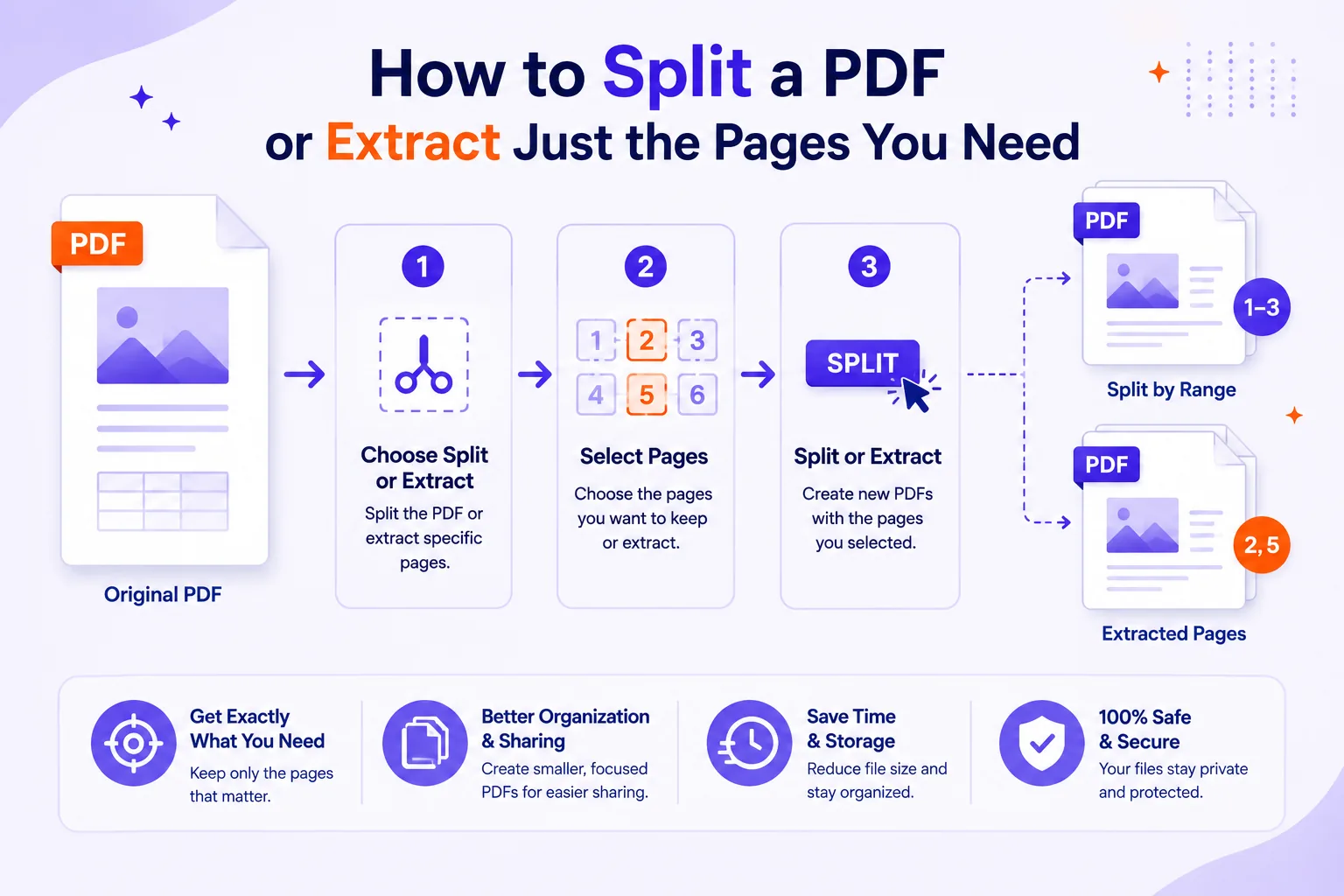
Someone asks for "the warranty section" and what you have is a 214-page contract as one PDF. Or the scanner hands back a single 60-page file that is actually eighteen separate invoices, each of which needs to end up in a different folder.
Both are page-selection problems, and they are not the same problem. Getting the distinction straight first saves a lot of undoing later.
Splitting and extracting are different jobs
The words get used interchangeably, but the outcomes differ in a way that matters when you are about to overwrite a file.
| Splitting | Extracting | |
|---|---|---|
| Input | One file | One file |
| Output | Many files that together cover every page | One file containing a subset |
| Original | Conceptually replaced by the parts | Stays whole, untouched |
| Typical trigger | A scanned batch, a book with chapters | "Can you send me pages 12 and 13" |
| Pages left over | None, every page lands somewhere | Everything you did not select stays behind |
A third operation is often what people actually mean: removing pages, which produces the original minus a few pages. Extracting pages 5-6 and deleting pages 5-6 give you two different files, and only one is what your colleague asked for.
The page numbers printed on the page are not the PDF's page numbers
This is the single most common cause of "you sent me the wrong pages". A PDF has an internal ordering, page 1 is the first sheet in the file, whatever is on it, and separately it may carry page labels, defined in ISO 32000-2:2020, clause 12.4.2, which is what the viewer shows in its page box.
Labels can be Arabic numerals, upper- or lowercase Roman numerals, or letter sequences, each starting at any value, optionally with a text prefix (PDF Association). That is how a book gets a cover, then i-xii of front matter, then Arabic 1 onwards. In that document, printed page 1 is the fourteenth page in the file.
Two rules that keep you out of trouble:
- Trust the page-count box in the viewer, not the ink on the paper. If your viewer shows "14 (1 of 226)", the file index is 14.
- When you tell someone which pages you sent, say both: "pages 12-13 of the printed numbering, sheets 25-26 of the file."
Page-range syntax you will meet
Most tools accept commas and dashes. Command-line tools go further. I ran each of these against a 120-page test file with qpdf 11.9.0 to confirm the counts:
| Notation | Meaning | Pages returned |
|---|---|---|
1-5 |
Inclusive range | 5 |
1,3,7 |
Individual pages | 3 |
5-1 |
Range in reverse order | 5 |
z |
Last page | 1 |
r3-r1 |
Last three pages, in order | 3 |
1-20:even |
Even positions in that range | 10 |
1-10,x3-4 |
Range minus an exclusion | 8 |
The z and r forms, the :odd/:even modifiers and the x exclusion prefix are qpdf's syntax, not universal. Browser tools generally accept the plain 1-5, 8, 11-13 form, which covers most needs.
Four ways to cut a batch apart
- Fixed interval. Every N pages becomes a file. Correct only when every document in the batch is genuinely the same length, a stack of identical two-page forms, for instance.
- Every page. One file per page. Useful for a pile of single-sheet receipts, punishing for anything else.
- At bookmarks or chapters. The cleanest cut for a book or report that has a real outline, because the boundaries were authored rather than guessed.
- At blank separator pages. Put a blank (or bright-colored) sheet between documents before the batch goes into the feeder, then cut at the separators and discard them. Note that a scanned blank sheet is not an empty page, it contains a picture of paper, with speckles, so detection works on an ink-coverage threshold, and a faint page can be missed.
What survives the cut
Here I tested rather than guessed. I built a 120-page PDF, 140,731 bytes, with one embedded font, 12 bookmarks and one internal link per page pointing at page 100, then cut it two ways with qpdf.
Extracting pages 41-50 produced a 32,456-byte file: 8% of the pages, 23% of the bytes. The embedded font is copied whole into the extract, so per-page size went from about 1.2 KB to about 3.2 KB.
All 12 bookmarks came across, but only one pointed at a page still in the file; the other eleven were dangling. All ten internal links pointed at the object for page 100, which was not in the output. A link to a page that is no longer in the file is simply broken, and how it fails depends on the viewer.
Splitting all 120 pages into single-page files produced 2,695,387 bytes total, 19.2 times the original, roughly 22 KB per file, because the shared font resource is duplicated into each one. The bookmarks disappeared entirely, qpdf's own docs are explicit that with --split-pages, "outlines, threads, and other document-level features of the original PDF file are not preserved."
Form fields behave in a third way again. With a four-page form carrying one text field on page 3, extracting pages 3-4 kept the form dictionary, the field and its stored value. Extracting pages 1-2 dropped the form dictionary altogether, since the only field's widget was on a page that went away.
The practical summary: expect bookmarks to be either stale or gone, expect internal cross-references to break, expect the sub-file to be larger per page than the parent, and check any form before sending it.
The jobs, step by step
Pulling one chapter out of a book
- Open the bookmark pane and click the chapter heading. Read the file index from the viewer's page box, not the printed folio.
- Do the same for the chapter after it, and subtract one to get your last page.
- Extract that range with Qikks Tools' extract-pages tool, the original stays intact.
- Open the result and check the first and last page are the ones you meant.
- If the chapter's cross-references matter, say so in the covering message rather than assuming they still work.
A stack of invoices scanned in one pass
- If every invoice is the same length, split at that fixed interval with the split tool and you are done.
- If lengths vary, rescan with a blank separator sheet between documents and split at the blanks.
- If rescanning is not an option, split at every page, then merge the pages of each invoice back together. Tedious, but it never mis-cuts.
- Rename the outputs immediately.
part-007.pdfis worthless in a month;2026-03-14-acme-1043.pdfis not.
A double-sided scan done in two passes
Feeding the stack face-up gives you odds 1, 3, 5…; flipping the whole stack and feeding it again gives you evens in reverse order, 20, 18, 16… They need interleaving, with the second file reversed.
I verified the fix on a 20-page test: qpdf --empty --collate --pages odds.pdf 1-z backs.pdf z-1 -- fixed.pdf returned pages 1 through 20 in correct order. In a GUI, look for a merge option named "alternate and mix" or similar, with a reverse-second-file checkbox. Then spot-check page 2 and the second-to-last page, which is where an off-by-one shows up first.
Sending the two pages a colleague actually asked for
- Confirm which numbering they used. "Page 12" from a printed copy may be sheet 25 in the file.
- Extract those pages only. A 200-page report emailed for two pages wastes their time more than your bandwidth.
- Name the file after its content, not its range.
- In the message, state both numberings.
Removing pages is not redaction
If pages 40-45 contain salary figures and you extract pages 1-39 for someone outside the team, the numbers are genuinely absent from the new file. That much is fine. What is not fine is treating page removal as a general privacy control.
Anything sensitive on the pages you kept is still there, text under a black rectangle is still selectable text, and metadata, attachments, comments and hidden layers travel with the document. Acrobat treats these as two separate operations for that reason: redaction removes the marked content, and a follow-up sanitize step removes "information that is not visible in the file, such as comments, metadata, or hidden layers" (Adobe). If the document is medical, legal or contains identity data, redact and sanitize properly, and prefer a tool that processes the file in your browser rather than uploading it.
Before you send it
- Is this an extract (original survives) or a split (original becomes parts)?
- Did you read page numbers from the viewer's index, not the printed folio?
- Opened the output and checked the first and last page?
- Any bookmarks or internal links that now point nowhere?
- Any form fields that need to still work?
- Is the filename meaningful to the person receiving it?
- Is anything sensitive still on the pages you kept?